HTML 파일 쓰기
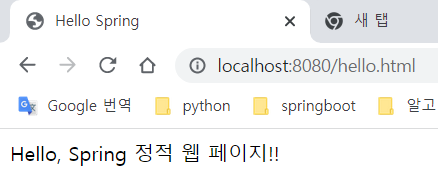
정적/hello.html
<!DOCTYPE html>
<html lang="ko">
<head>
    <meta charset="UTF-8">
    <title>Hello Spring</title>
</head>
<body>
<div>
    Hello, Spring 정적 웹 페이지!!
</div>
</body>
</html>
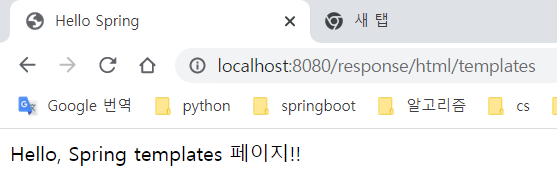
템플릿/hello.html
<!DOCTYPE html>
<html lang="ko" >
<head>
    <meta charset="UTF-8">
    <title>Hello Spring</title>
</head>
<body>
<div>
    Hello, Spring templates 페이지!!
</div>
</body>
</html>
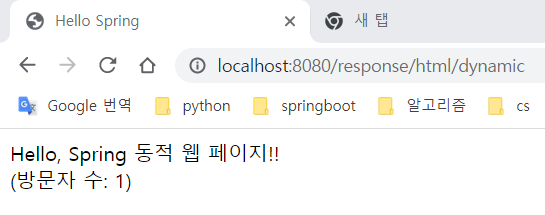
템플릿/hello-visit.html
<!DOCTYPE html>
<html lang="ko" xmlns:th="http://www.thymeleaf.org">
<head>
    <meta charset="UTF-8">
    <title>Hello Spring</title></head>
<body>
<div>
    Hello, Spring 동적 웹 페이지!!
</div>
<div>
    (방문자 수: <span th:text="${visits}"></span>)
</div>
</body>
</html>
GetMapping 사용
– HelloResponseController.java의 전체 코드는 하단에 있습니다.
1. “redirect:URL” 반환
@Controller
@RequestMapping("/response")
public class HelloResponseController {

    @GetMapping("/html/redirect")
    public String htmlFile() {
        return "redirect:/hello.html";
    }
}- localhost:8080/response/html/redirect에 액세스할 때
2. “HTML 파일 이름” 반환
@Controller
@RequestMapping("/response")
public class HelloResponseController {

    @GetMapping("/html/templates")
    public String htmlTemplates() {
        return "hello";
    }
}- localhost:8080/response/html/templates에 액세스할 때
3. “HTML 코드” 반환
@Controller
@RequestMapping("/response")
public class HelloResponseController {

    @ResponseBody
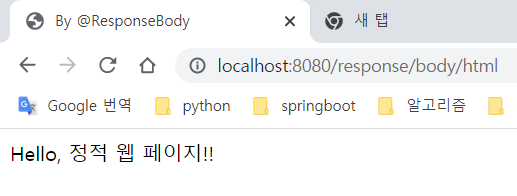
    @GetMapping("/body/html")
    public String helloStringHTML() {
        return "<!DOCTYPE html>" +
                "<html>" +
                "<head><meta charset=\"UTF-8\"><title>By @ResponseBody</title></head>" +
                "<body> Hello, 정적 웹 페이지!!</body>" +
                "</html>";
    }
}- localhost:8080/response/body/html에 액세스할 때
4. 모델 및 Thymeleaf 템플릿
@Controller
@RequestMapping("/response")
public class HelloResponseController {

    private static long visitCount = 0;

    @GetMapping("/html/dynamic")
    public String helloHtmlFile(Model model) {
        visitCount++;
        model.addAttribute("visits", visitCount);
        return "hello-visit";
    }
}- localhost:8080/response/html/dynamic에 액세스할 때
5. “JSON 문자열” 반환
@Controller
@RequestMapping("/response")
public class HelloResponseController {

    @ResponseBody
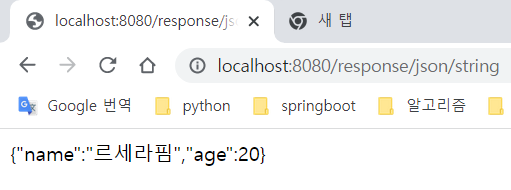
    @GetMapping("/json/string")
    public String helloStringJson() {
        return "{\"name\":\"르세라핌\",\"age\":20}";
    }
}- localhost:8080/response/json/string에 액세스할 때
6. 객체 반환
- Star.java
@Getter @Setter
@AllArgsConstructor
public class Star {
    String name;
    int age;
}
- HelloResponseController.java
@Controller
@RequestMapping("/response")
public class HelloResponseController {

    @ResponseBody
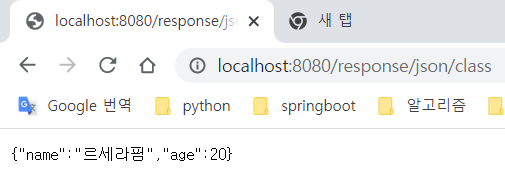
    @GetMapping("/json/class")
    public Star helloJson() {
        return new Star("르세라핌", 20);
    }
}- localhost:8080/response/json/class에 액세스할 때
- HelloResponseController.java(전체 코드)
@Controller
@RequestMapping("/response")
public class HelloResponseController {

    private static long visitCount = 0;

    @GetMapping("/html/redirect")
    public String htmlFile() {
        return "redirect:/hello.html";
    }

    @GetMapping("/html/templates")
    public String htmlTemplates() {
        return "hello";
    }

    @ResponseBody
    @GetMapping("/body/html")
    public String helloStringHTML() {
        return "<!DOCTYPE html>" +
                "<html>" +
                "<head><meta charset=\"UTF-8\"><title>By @ResponseBody</title></head>" +
                "<body> Hello, 정적 웹 페이지!!</body>" +
                "</html>";
    }

    @GetMapping("/html/dynamic")
    public String helloHtmlFile(Model model) {
        visitCount++;
        model.addAttribute("visits", visitCount);
        return "hello-visit";
    }

    @ResponseBody
    @GetMapping("/json/string")
    public String helloStringJson() {
        return "{\"name\":\"르세라핌\",\"age\":20}";
    }

    @ResponseBody
    @GetMapping("/json/class")
    public Star helloJson() {
        return new Star("르세라핌", 20);
    }
}